Benchmarking a t2.micro EC2 Instance
I was curious how much performance you can really get out of a free tier EC2 instance, so I decided to run some benchmarks on one of them. The "t" class burstable instances seem to benchmark inconsistently at times, so I ran these benchmarks with multiple attempts.
Benchmark Setup
First, I started with a t2.micro (1 CPU, 1 GB memory, 10 GB disk) EC2 instance in the US-West2 (Oregon) region running RHEL 7.4.
I then installed the sysbench benchmarking tools with the following commands
yum -y update (Because patching your boxes is important, dawg!)
So, let's keep the system busy with a longer CPU benchmark:
sysbench cpu --cpu-max-prime=120000000 --threads=2 run
This helps to keep the CPU busy at 100% utilization for awhile. As a result, we start to burn though our CPU credits as shown here:
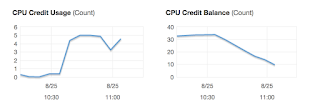
I was able to burn though the CPU credits for this instance in about 45 minutes. I then run my original CPU benchmark from before:
sysbench cpu --cpu-max-prime=6000000 --threads=2 run
It now takes 121.25 seconds to run. BIG performance difference.
When I get some free time, I should run these benchmarks on larger instance types and see if I get similar results. Stay tuned...
Benchmark Setup
First, I started with a t2.micro (1 CPU, 1 GB memory, 10 GB disk) EC2 instance in the US-West2 (Oregon) region running RHEL 7.4.
I then installed the sysbench benchmarking tools with the following commands
yum -y update (Because patching your boxes is important, dawg!)
yum install https://dl.fedoraproject.org/pub/epel/epel-release-latest-7.noarch.rpm
yum install sysbench
Basic Benchmarks
After I got sysbench installed, I ran these rather basic CPU benchmarks a few times:
sysbench cpu --cpu-max-prime=6000000 --threads=1 run
sysbench cpu --cpu-max-prime=6000000 --threads=2 run
A t2.micro instance only has a single CPU, so the results for a dual threaded workload were basically the same as the single threaded workload. In both cases, the benchmarks completed in roughly 19 1/2 seconds.
How fast is that? Not all that fast. When I ran this same benchmark on a Core i3 based desktop, it also completed the benchmark in about 19.5 seconds.
How fast is that? Not all that fast. When I ran this same benchmark on a Core i3 based desktop, it also completed the benchmark in about 19.5 seconds.
I then followed that up with a basic disk I/O benchmark:
sysbench --num-threads=16 --test=fileio --file-total-size=1G --file-test-mode=rndrw prepare
The creation process takes 15.8 seconds, at a rate of 65 MB/sec
sysbench --num-threads=16 --test=fileio --file-total-size=1G --file-test-mode=rndrw run
Here are the stats from this run:
File operations:
reads/s: 1790.95
writes/s: 1193.44
fsyncs/s: 3813.25
Throughput:
read, MiB/s: 27.98
written, MiB/s: 18.65
General statistics:
total time: 10.0346s
total number of events: 68225
Finally, let's clean up after ourselves:
sysbench --num-threads=16 --test=fileio --file-total-size=1G --file-test-mode=rndrw cleanup
I then ran this benchmark a second time, and got basically the same result.. a 10 second run.
Exploring CPU Throttling
Exploring CPU Throttling
The thing to remember about "t" class EC2 instances is that the performance on them will drop if you run a constant workload on it. I'm not sure what the "t" really stands for in an AWS EC2 instance parlance, but perhaps it should stand for "throttled".
To get a good idea how the system will perform under a constant load, we should run these benchmarks for a longer time and see what happens when AWS starts throttling us.
To get a good idea how the system will perform under a constant load, we should run these benchmarks for a longer time and see what happens when AWS starts throttling us.
So, let's keep the system busy with a longer CPU benchmark:
sysbench cpu --cpu-max-prime=120000000 --threads=2 run
This helps to keep the CPU busy at 100% utilization for awhile. As a result, we start to burn though our CPU credits as shown here:

I was able to burn though the CPU credits for this instance in about 45 minutes. I then run my original CPU benchmark from before:
sysbench cpu --cpu-max-prime=6000000 --threads=2 run
It now takes 121.25 seconds to run. BIG performance difference.
When I get some free time, I should run these benchmarks on larger instance types and see if I get similar results. Stay tuned...
Comments
Post a Comment